Professional KG Lock Solution

KG LOCK BYPASS

Factory Reset with Confidence using Samsung Tool

Login
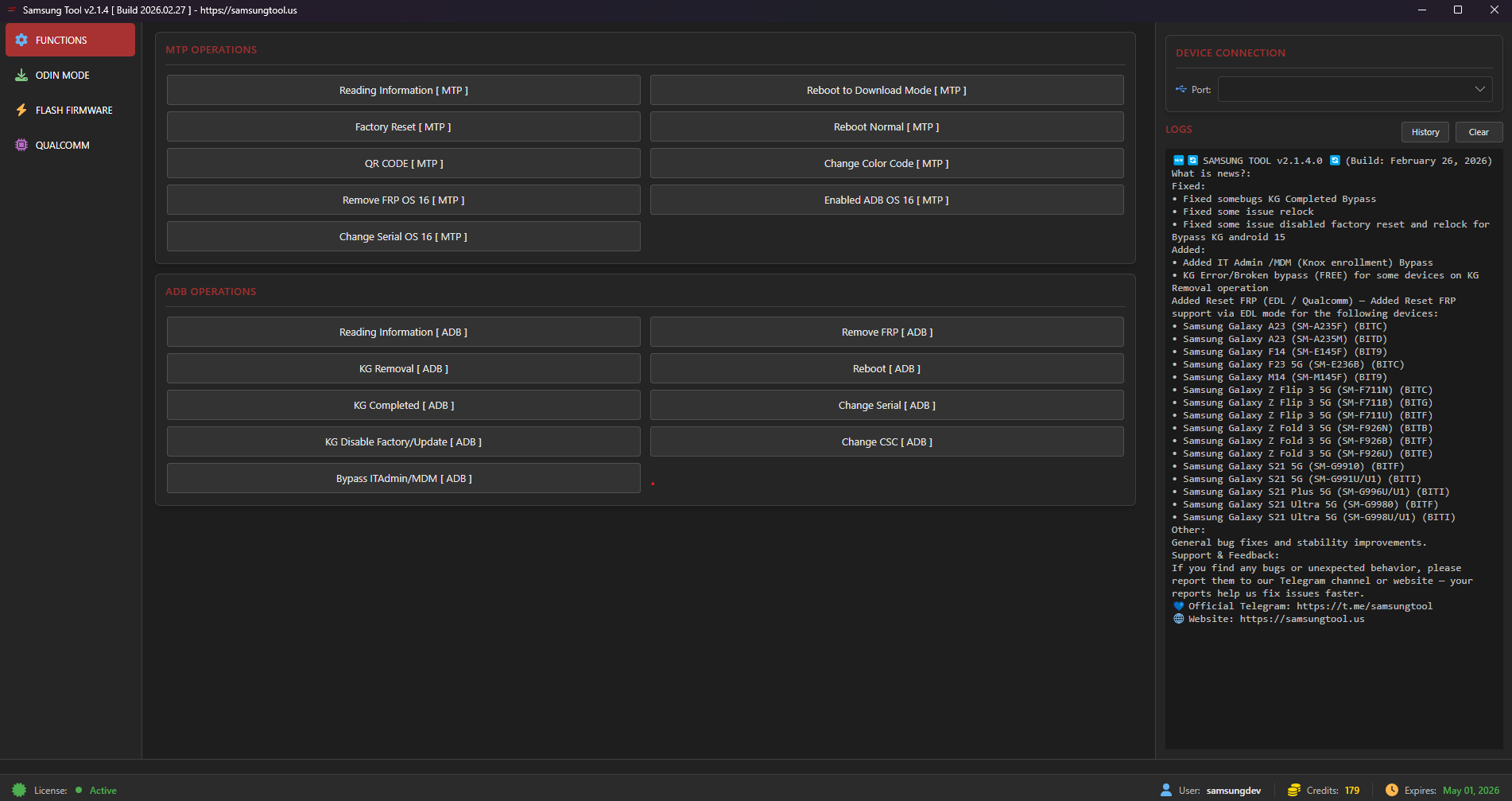
Samsung Tool Screenshot

Key Features

Professional-grade solution with industry-leading stability and performance

STABLE KG LOCK BYPASS

Completely hides all Knox Guard notifications and restrictions, allowing you to use the device like normal.

FACTORY RESET OK

Perform a factory reset with peace of mind. The device will not re-lock, and you remain in full control of your data.

QUICK & EASY OPERATION

Just a few clicks to complete. No deep technical knowledge required—perfect for all users.

SAFE FOR YOUR DEVICE

Software-based solution that does not interfere with your device's hardware or internal system components.

New — Samsung 2026 Updates (Qualcomm, Exynos) & Improvements

Latest support, patches and protocols added for 2026 Samsung devices, including Qualcomm and Exynos platforms, Knox Guard fixes, Odin direct ZIP, MTP/ADB enhancements and FRP solutions.

Support: Samsung 2026 (Qualcomm)

Latest Qualcomm loaders and servicing functions.

  • Support 300+ Samsung Qualcomm models with latest loaders
  • Flash / Erase / Backup
  • Factory Reset
  • Remove FRP / Remove Lost Mode / Remove "Please Call Me"
  • MDM Can't Download handling
  • Change Serial Number
  • Backup / Erase EFS
  • Read GPT / Read Info

Added FRP Removal [EXYNOS]

  • New Exynos FRP Removal method added
  • Supports latest Samsung Exynos devices
  • One-click FRP removal process
  • No test point required on supported devices
  • Android 13 / 14 / 15 / 16 support
  • Improved success rate and processing speed

Knox Guard (KG) Removal

  • KG Removal All FIXED
  • No re-lock after successful removal
  • Support PayJoy Lock
  • Support Device Control Lock
  • Support Offline Lock
  • Patch support up to 03-2026

Odin, MTP & ADB

  • Direct ZIP Flash support
  • No extraction required
  • Change CSC
  • Change Serial Number
  • Advanced MTP Operations
  • Latest 2025–2026 patches

MDM & IT Admin Bypass

  • MDM Enrollment Bypass
  • Remove IT Policy Restrictions
  • Fix Device Managed Issues
  • Admin Lock Removal
  • Selected 2025–2026 Models Supported

Notes: Patches listed apply to specific device subsets and firmware revisions. Refer to the latest in-app changelog for detailed model compatibility. All operations are performed through software-based procedures and are optimized for maximum device stability when executed according to instructions.

🛠️ Step-by-Step Guide

Follow these simple steps to successfully bypass KG Lock

📌 PART 1: Preparation

1

Computer with Samsung USB drivers installed

2

High-quality USB cable for stable connection

3

KG Remove All OS 13-16 tool ready

4

Phone battery above 50%

⚙️ PART 2: Steps to Follow

1

Access QR Code scanning mode from Hello screen

2

Scan QR code to enable ADB debugging

3

Run bypass tool with USB connection

4

Reboot and perform factory reset

5

Setup device normally

❓ PART 3: Troubleshooting

Problem: Device still shows KG Lock after Factory Reset.

Solution: Don't worry. Just repeat the process from Step 1. Re-running the procedure often fixes the issue.

Download

Click below to download the latest version of the tool:

Download Samsung Tool

Make sure to install Samsung USB drivers before use.

Supported Models

Compatible with a wide range of Samsung devices

Galaxy A Series

Model: All

OS: Android 10 - 16

Galaxy M Series

Model: All

OS: Android 10 - 16

Galaxy S Series

Model: All

OS: Android 10 - 16

Galaxy Z Series

Model: All

OS: Android 10 - 16

Galaxy Tab Series

Model: All

OS: Android 10 - 16

📌 Important Notes

This is a Bypass solution; it does not permanently remove the lock from Samsung's servers.

⚠️ To ensure stability: Please do not install OTA software updates after bypassing.

🚫 SECURITY POLICY: Any attempt to use unauthorized software to interfere with, sniff network packets, or copy the tool will be automatically detected. Accounts in violation will be permanently banned without notice.

✅ Ideal For:

Repair shops, technicians, and end users who need to use their device immediately without waiting.

🔥 Contact us now for detailed consultation and pricing! 🔥

FAQ

Common questions about Samsung KG Lock bypass

Is this a permanent KG removal?

No. This is a bypass solution. It does not permanently remove KG from Samsung servers.

Can I factory reset after bypass?

Yes. Factory reset is supported and device should not re-lock (supported devices & patches).

Which Android versions are supported?

Android 10 to Android 16 for supported Samsung models.

Disclaimer

Please read carefully before using Samsung KG Lock bypass

⚠ Important Notice

This content is provided for educational and informational purposes only. We do not promote or support illegal activities, theft, or unauthorized access to devices.

Educational Purpose Only

All demonstrations are created to help device owners troubleshoot Samsung KG / Knox Guard activation issues and support right-to-repair awareness. No illegal or pirated software is distributed.

Use At Your Own Risk

Any action you take based on this information is strictly at your own responsibility. We are not responsible for damages, data loss, warranty issues, or any misuse of the provided guidance.

By continuing to use this content/tool, you agree to follow applicable laws and use it responsibly.

✅ Allowed Use

  • For legitimate owners of the Samsung device.
  • For fixing KG / Knox Guard activation errors.
  • For education, troubleshooting, and right-to-repair purposes.

⛔ Prohibited Use

  • Use on stolen, lost, or unauthorized devices.
  • Resale fraud, commercial illegal use, or bypass-for-profit activities.
  • Sharing pirated software or malicious tools.

ℹ Additional Notice

This content is not affiliated with, endorsed by, or supported by Samsung Electronics. Users must comply with local laws and regulations regarding system modifications.

Samsung and Knox Guard are trademarks of their respective owners. Use responsibly.

🏆 Official Distributors

Trusted partners worldwide

🤝 Authorized Resellers & Technical Partners

Global network of certified partners

Adyunlocker

🔹 Adyunlocker

📞 +1 281 672 8384

💬 Telegram: adyhelpbot

🌐 Website: www.adyunlocker.com/

📍 Dubai, UAE

Legitunlocks

🔹 Legitunlocks

Gsm Africa Official

🔹 Gsm Africa Official

📞 gsmafrica

💬 Telegram: gsmafrica1

🌐 Website: www.gsmafrica.com/

📍 South Africa

Topunlocksite

🔹 Topunlocksite

GsmGenesis Team

🔹 GsmGenesis Team

📞 +12035167676

💬 Telegram: GsmGenesis

🌐 Website: www.gsmgenesis.com/

FRP King Server

🔹 FRP King Server

Gsm Pak Official

🔹 Gsm Pak Official

📞 27720386432

💬 Telegram: gsmpak

🌐 Website: www.gsmpak.com/

📍 Worldwide , Pakistan , Africa Countries

Activeunlocker

🔹 Activeunlocker

BeeUnlock

🔹 BeeUnlock

📞 +84907685453

💬 Telegram: BeeUnlock

🌐 Website: beeunlock.com

GsmEasy

🔹 GsmEasy

📞 +8613926070786

💬 Telegram: gsmeasy

🌐 Website: imei.us

Fastunlocker

🔹 Fastunlocker

📞 +91 93561 23456

💬 Telegram: FastUnlockers

🌐 Website: fastunlockers.us

📍 India

Appleunlockers

🔹 Appleunlockers

📞 +8801757574757

💬 Telegram: +8801757574757

🌐 Website: appleunlockers.com/

📍 Bangladesh, Philippines , Worldwide

eSimUNlocker

🔹 eSimUNlocker

📞 +16704836795

💬 Telegram: eSimUnlockersupport

🌐 Website: esimunlocker.com/

📍 Reseller Worldwide

Resellerunlocker

🔹 Resellerunlocker

GSMUnlockInfo

🔹 GSMUnlockInfo

📞 gsmunlockinfo

💬 Telegram: GSMUnlockInfo

🌐 Website: gsmunlockinfo.com/

✉️ [email protected]

📍 South Africa / Pakistan

Martlobs GSM

🔹 Martlobs GSM

📞 +50765646009

💬 Telegram: MARTLOBSGSM

🌐 Website: martlobsgsm.com/

TerritorioUnlock

🔹 TerritorioUnlock

📞 +524423770610

💬 Telegram: TerritorioUnlock

🌐 Website: territorioremoto.com/

📍 México - Worldwide

UNLOCK  EASY

🔹 UNLOCK EASY

📞 +8801713-323205

💬 Telegram: unlockeasy

🌐 Website: www.unlockeasy.us/

📍 Bangladesh - Worldwide

DM Unlocker

🔹 DM Unlocker

📞 +8801747113074

💬 Telegram: dmunlockerserver

🌐 Website: dmunlocker.com/

✉️ [email protected]

📍 Brazil & Worldwide, Bangladesh

PuntoDigitalServer

🔹 PuntoDigitalServer

📞 573184435189

💬 Telegram: puntodigitalbuga

🌐 Website: www.puntodigitalserver.com/

📍 Colombia - WorldWide

GsmNinja

🔹 GsmNinja

📞 +919315532726

💬 Telegram: gsmninja

🌐 Website: www.gsmninja.com/

✉️ [email protected]

📍 India - Reseller Worldwide

Imran Vip Unlocking

🔹 Imran Vip Unlocking

📞 +923364155557

💬 Telegram: Imranvipunlockingdotcom

🌐 Website: imranvipunlocking.com/

✉️ [email protected]

📍 Pakistan and Worldwide

Ohidera Unlocker

🔹 Ohidera Unlocker

📞 +8801660122234

💬 Telegram: ohideraunlockerofficialchannel

🌐 Website: ohideraunlocker.com/

✉️ [email protected]

📍 Bangladeshf , UAE, Brazil & Worldwide
GSM-T-TOOL

🔹 GSM-T-TOOL

📞 +9647708689458

💬 Telegram: GsmTtoolSupport_bot

🌐 Website: gsm-t-tool.com/

📍 WorldWide Reseller

CleanUnlockerTeam

🔹 CleanUnlockerTeam

📞 +96890225071

💬 Telegram: cleanunlockerteam

🌐 Website: cleanunlocker.com/

✉️ [email protected]

📍 WORLDWIDE/BANGLADESH /OMAN/BRAZIL/MEXICO

SALIF GSM

🔹 SALIF GSM

📞 919304697499

💬 Telegram: GSMCREDIT

🌐 Website: www.gsmcredit.in/

Hellounlocker

🔹 Hellounlocker

GSMFASTEST

🔹 GSMFASTEST

GsmBrothers

🔹 GsmBrothers

📞 923492429933

💬 Telegram: Gsm_Brothers

🌐 Website: gsmbrothers.com/

📍 Pakistan, South Africa and WorldWide

Gsm Player

🔹 Gsm Player

📞 +923146616935

💬 Telegram: GsmPlayerupdate

🌐 Website: gsmplayer.org/

📍 PAKISTAN / WORLDWIDE

GsmServer

🔹 GsmServer

🔹 Technical Partner Program

Are you a technician interested in distributing or supporting our tool?
👉 Contact us now to become a partner!

Samsung Tool

KG Lock Bypass Utility — fast, secure & trusted service.

Quick Links

Security Notice

⚠️ We only contact customers via our official Telegram Bot: @samsungtool_bot. We never message first.

© 2026 Samsung Tool. All rights reserved.

Designed for dealers & resellers • Secure payments • Fast delivery